
How to Diagnose Plant Disease With Phone Photos Safely
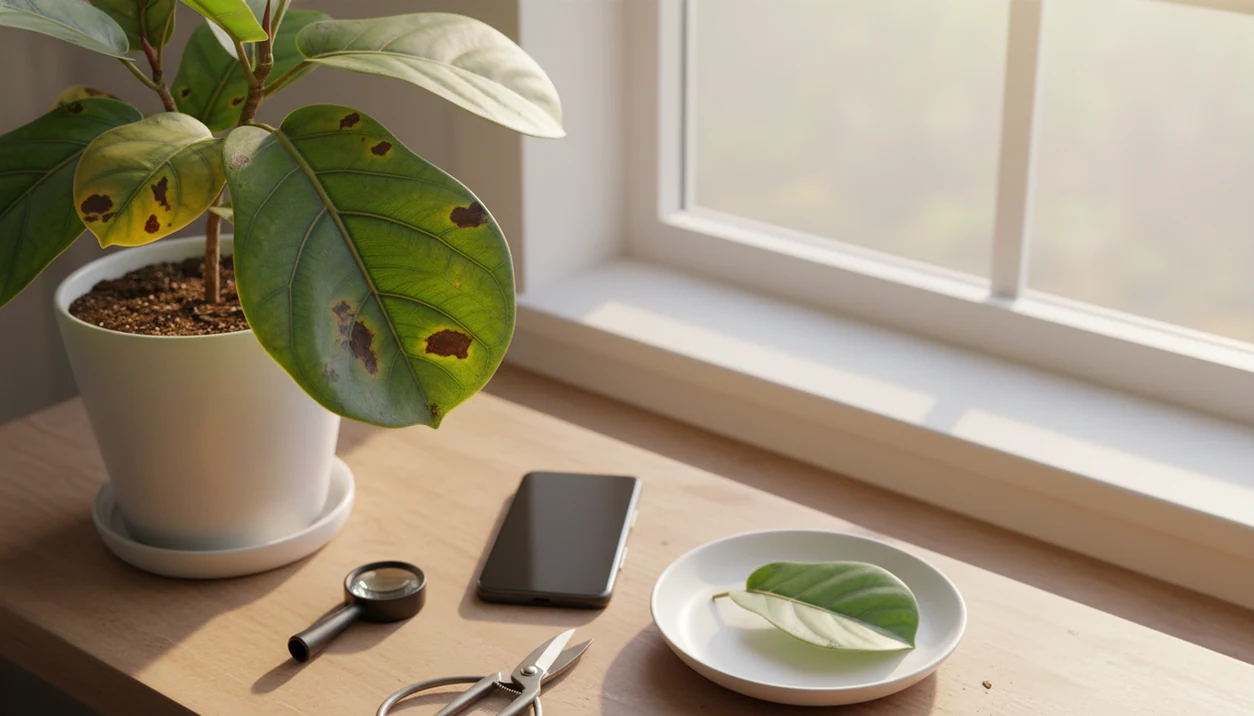
To learn how to diagnose plant disease with phone, take sharp images of the whole plant, damaged leaves, leaf undersides, stems, soil, and roots, then combine the photo result with the plant name, symptoms, pests, and growing conditions before treating. A phone can give a likely diagnosis, not a guaranteed final answer.
Definition: Phone plant diagnosis is the process of using smartphone photos plus plant context to identify the most likely disease, pest, nutrient, watering, or environmental cause of visible plant symptoms.
TL;DR
- Use phone photos for triage first, not instant treatment decisions.
- Photograph the whole plant, close-up symptoms, leaf undersides, stems, soil, and roots when safe.
- Verify any plant disease photo diagnosis with symptom patterns and trusted guidance before spraying, pruning, or discarding a plant.
Phone Plant Diagnosis Basics Before You Start
Phone plant diagnosis is a preliminary triage method, not a lab-confirmed diagnosis. It helps you narrow the likely cause before you prune, spray, isolate, repot, or change watering.
A yellowing lower leaf can point to age, soggy roots, low nitrogen, spider mites, or poor light. A brown spot may be fungal, bacterial, sun-scorched, or old physical damage. The phone result is useful only when you compare the leaf shape, stem, growth habit, and growing conditions.
Tools like [Plant Identifier App] identify plants from photos and give care, watering, and disease troubleshooting steps for plant owners. Use that result as a starting point. Do not spray, heavily prune, or discard a plant based on one photo match, especially if the photo was taken under yellow kitchen light at 10 p.m.
Pause before treatment.
Five Facts About Plant Disease Photo Diagnosis
- A phone photo is a starting point, not proof that a pathogen is present.
- Whole-plant pattern and close-up symptom detail are both needed for useful plant disease photo diagnosis.
- Plant species matters because the same spotting, yellowing, or curling pattern can mean different things on different plants.
- Accuracy claims depend on dataset size, crop range, label quality, and testing conditions.
- Verification should happen before treatment, especially before fungicides, insecticides, major pruning, or disposal.
We often see users photograph one pretty leaf and miss the stem, pot, soil surface, and neighboring leaves. That hides the real pattern. For leaf spotting specifically, compare your photos with a focused plant leaf spots diagnosis process before assuming infection.
How Phone Plant Diagnosis Works Behind the Camera
Phone plant diagnosis works by capturing an image, extracting visible features, comparing them with labeled examples, and ranking likely matches. In AI systems, image embeddings turn visual clues into patterns a model can compare. In plain terms, the app looks for similarities.
The system may compare spots, discoloration, wilting, lesions, mildew, pest marks, edge burn, and nutrient-like patterns. Penn State described its Nuru mobile app as using AI and machine learning to provide a preliminary diagnosis from smartphone images source. A USDA-referenced PlantVillage system was reported to diagnose 26 diseases in 14 crops with 99% accuracy in controlled use, using more than 54,300 images source.
Controlled results do not mean every houseplant photo will perform the same. A dusty fiddle leaf fig in a dim hallway is not a clean crop image.
How to Use a Phone for Plant Disease Photo Diagnosis
Use a phone workflow that documents the plant before asking the app to guess. For home growers, multiple ordinary photos are often better than one dramatic close-up because symptoms form a pattern across the plant.
- Clean the lens and photograph in bright indirect light. A sheer curtain softening noon sun often gives better detail than flash.
- Capture the whole plant from the front and side. Include the pot, soil surface, nearby plants, and overall posture.
- Photograph close-ups of damaged tissue, healthy tissue, leaf undersides, stems, soil line, and visible pests. Use a finger, coin, or ruler for scale when marks are tiny.
- Add plant name, symptom start date, watering, light, temperature, fertilizer, recent repotting, and whether symptoms are spreading.
- Compare the app result with trusted guidance before choosing care changes or treatment.
A useful phone diagnosis workflow should return likely matches, confidence cues, and next care steps rather than presenting one image result as certainty.
Step 1: Photograph the Whole Plant Disease Pattern
Does the whole plant pattern matter for phone plant diagnosis? Yes, because symptom location often tells you more than one damaged leaf.
Photograph older leaves, new leaves, the lower canopy, the side facing a window, and any single branch that is declining. Include the pot, soil surface, nearby leaves, and the plant’s posture. Uniform yellowing suggests a different problem than scattered spots, edge burn, sudden wilt, or one-branch collapse.
A single close-up can hide the real pattern. Leggy stems leaning toward glass may point toward low light, while spotted lower leaves near damp soil may suggest splash-related disease pressure. If yellowing is the main issue, use a separate workflow to diagnose yellow leaves before treating it as infection.
Step 2: Capture Close-Up Phone Photos of Symptoms
Sharp close-ups help the app compare symptom details, but they should show both affected and unaffected tissue. The contrast matters.
Photograph the leaf top, leaf underside, stem, buds, fruit, and soil line when relevant. Pests often hide under leaves and at nodes, where a top-down photo misses them. Include a finger, coin, or ruler when lesions, eggs, webbing, or insects are small.
Avoid filters, heavy digital zoom, flash glare, and wet leaves unless the wetness is part of the symptom. If you rinsed the plant first, say so. Water droplets can make mildew, bacterial ooze, and ordinary shine harder to separate. For visible insects, a dedicated guide can help you identify plant pests from photo.
Step 3: Add Plant Name and Growing Conditions
Identify the plant first if you do not know it. The same brown tip on a calathea, dracaena, tomato, and citrus plant can point in different directions.
Add watering frequency, drainage, light exposure, humidity, temperature swings, fertilizer, pesticide use, recent repotting, new plant purchases, and outdoor weather. Also note whether symptoms are spreading. A plant tag missing from a nursery pot is common, so take a second photo in natural light and compare the leaf shape, stem, and growth habit.
PlantApp connects plant identification with care, watering, and troubleshooting context, which helps reduce false plant disease matches. A likely match is stronger when the plant name, symptom pattern, and care history all point the same way. For ongoing schedules, a houseplant care app can keep those details from living only in memory.
Step 4: Separate Disease, Pests, Watering, and Nutrient Stress
Disease-looking leaves do not always mean a pathogen is present. Many plant problems overlap, so compare the visible sign with the whole plant and recent care.
This is why plant clinics and extension guides separate symptoms from causes: similar leaf damage can come from pathogens, insects, nutrients, water stress, herbicide exposure, or weather conditions source.
| Look-alike problem | Common phone clues | First low-risk check |
|---|---|---|
| Fungal leaf spots | Round or irregular spots, sometimes with yellow halos | Remove worst leaves and improve airflow |
| Spider mite stippling | Fine pale dots, webbing, dusty undersides | Inspect nodes and leaf backs closely |
| Sunburn | Bleached or crispy patches on exposed sides | Check recent light changes |
| Fertilizer burn | Brown edges or tips after feeding | Flush soil if appropriate |
| Root rot | Wilt with wet soil, soft stems, sour smell | Check roots only when safe |
| Underwatering | Limp leaves with dry, pulling soil | Rehydrate gradually |
| Nutrient deficiency | Patterned yellowing or pale new growth | Review fertilizer and pH clues |
Isolate a plant if pests or infectious disease are plausible, but delay harsh treatment until evidence is stronger. A mushy cactus base after watering is a root-zone clue, not just a leaf symptom.
Step 5: Verify the Phone Plant Diagnosis Before Treatment
Verify the phone plant diagnosis before treatment by comparing the app result with university extension, plant pathology, or trusted plant-care guidance. Check whether the symptoms, host plant, season, spreading pattern, and environment match the suggested cause.
For higher-risk cases, compare the result with a university extension diagnostic resource or clinic; for example, the University of Minnesota Extension explains that accurate plant diagnosis depends on symptoms, signs, host plant, and site conditions source.
Start with low-risk care corrections when evidence points to watering, light, humidity, or drainage. Move a plant, adjust watering, increase airflow, remove badly damaged leaves, or quarantine it before reaching for chemicals. Reserve fungicides, insecticides, major pruning, or disposal for cases with stronger evidence.
Apps such as Agrio describe AI detection for diseases, pests, and nutrient deficiencies from smartphone-captured images, but users still need judgment. A good phone diagnosis workflow can organize the likely match and next care step, but it should not replace local expert verification. For broader tool comparison, a plant disease diagnosis app guide can help you judge features and limits.
Common Mistakes When Diagnosing Plant Disease With a Phone
The most common mistake is treating the phone result as a final diagnosis instead of a clue. Most bad matches come from missing context, poor light, or skipping simple checks before spraying.
Use this quick reset before you trust the label:
- Show the whole plant. Take one photo of the full plant, then add close-ups of damaged and healthy tissue so the app can compare the pattern.
- Check the basics first. Look for pests, wet or bone-dry soil, root trouble, drainage problems, and recent light changes before you reach for fungicide.
- Name the plant. Similar yellowing, curling, or brown spotting can mean different things on basil, pothos, citrus, roses, or tomatoes.
- Retake photos in neutral light. Avoid flash, glare, deep shadows, colored grow lights, and warm indoor bulbs that change leaf color.
- Separate old damage from active spread. A scarred leaf from last month does not prove a disease is moving now; compare new growth and mark whether spots are increasing.
If the result still feels uncertain, quarantine the plant and make low-risk care corrections while you gather better photos.
Common Myths About Diagnosing Plant Disease With Phone Photos
Myth 1: One clear photo can identify every disease. One photo may show a spot, but not the plant’s pattern, species, roots, or growing conditions.
Myth 2: An instant app result is accurate enough to treat immediately. A fast label still needs verification before spraying or pruning.
Myth 3: Phone diagnosis works equally well for every plant species and disease category. Many tools perform better on common crops or well-labeled symptoms.
Myth 4: Brown or yellow leaves always mean infection. Watering, roots, light, nutrients, age, and stress can look infectious.
Myth 5: Higher advertised accuracy always applies at home. Controlled datasets do not match every blurry windowsill photo, mixed garden bed, or old damaged leaf.
Simple, but easy to forget.
Limitations
Phone plant diagnosis is useful, but it has real limits. Treat the output as a likely match, especially when the plant is valuable, edible, rare, or part of a larger garden.
- Phone-based diagnosis often cannot distinguish look-alike problems without context.
- Image-only tools may confuse disease, pests, nutrient stress, watering problems, and environmental damage.
- Accuracy claims may come from limited crops, controlled datasets, or ideal lighting rather than home conditions.
- Many tools classify a likely label but do not prove the root cause.
- Some apps are stronger for common agricultural crops than unusual houseplants or mixed ornamental gardens.
- Poor photos, dirty lenses, shadows, glare, and old damage can reduce usefulness.
- Misdiagnosis can lead to unnecessary chemicals, over-pruning, plant disposal, or delayed simple care fixes.
When risk is high, check against a regional source or ask a local extension office, nursery specialist, or plant pathologist.
FAQ
Can phones diagnose plant disease?
Phones can suggest likely disease, pest, watering, nutrient, or environmental causes from photos. They usually cannot confirm a disease definitively without context or expert testing.
What photos diagnose plant disease best?
Use whole-plant shots plus close-ups of affected leaves, healthy leaves, undersides, stems, soil, and visible pests. Bright indirect light and a clean lens improve the result.
Is plant disease photo diagnosis accurate?
Accuracy varies by plant, disease type, image quality, dataset, and the context you provide. Treat the result as preliminary until the symptom pattern fits.
Can AI identify plant pests?
AI tools may detect visible pest signs such as webbing, stippling, insects, or eggs. You should still inspect undersides, nodes, stems, and soil.
Should I spray after app diagnosis?
Do not spray immediately unless the diagnosis is verified and the treatment matches the cause. Wrong sprays can waste time or damage the plant.
Why do plant apps disagree?
Plant apps use different datasets, labels, confidence thresholds, and symptom interpretations. Different photos of the same plant can also produce different likely matches.
Can yellow leaves mean disease?
Yellow leaves can mean disease, but they can also come from watering, light, nutrients, roots, age, or stress. Pattern and plant species matter.
Do roots need phone photos?
Root photos help when a plant wilts despite wet soil, smells rotten, has poor drainage, or may have root rot. Only remove the plant if it is safe and practical.
What if diagnosis is uncertain?
Isolate the plant if pests or infectious disease are possible, improve basic care, and retake photos in better light. Compare the result with trusted expert guidance before treatment.