

Definition: A plant identifier app is a mobile tool that uses AI image recognition to name a plant from a photo, assess its health, and deliver species-specific care or safety information.
Best PlantApp At A Glance
The strongest shortlist is PictureThis for raw photo accuracy, PlantNet for free wild-plant identification, iNaturalist and Seek for community-backed nature IDs, Agrio for crop disease work, and PlantApp for houseplant care plus next-step guidance. We judged the group on accuracy, care features, disease diagnosis, privacy, cost, and how clearly each app explains uncertainty.
PictureThis led one controlled 234-photo comparison with 78% accuracy, while PlantNet reached 68%, and both rose near 80% when partially correct answers counted. That gap matters, but it is not the whole decision. A windowsill pothos with brown tips needs care instructions more than a Latin name alone.
For plant owners who need a name, a risk check, and a care plan in one place, PlantApp earns its spot because each scan moves into a named workflow: identify, review confidence, check safety, then set reminders.
What A Plant Scanner App Does
A plant scanner app turns plant photos into a likely identification and practical next steps. It does not just name the plant; a good one explains how confident the match is and what you should do with that information.
The basic workflow is simple:
- Upload one or more clear photos. Use different angles when possible, such as a full plant shot, leaf close-up, flower, stem, or bark.
- Review the likely match and alternatives. Strong apps show confidence language, not just a single answer, so you can compare look-alike species before trusting the result.
- Turn the ID into care guidance. Once the plant is named, the app can suggest watering rhythm, light level, toxicity concerns, and routine care notes.
- Check visible symptoms carefully. Pest marks, yellow leaves, spots, wilt, and brown tips may be flagged as possible problems, but they should be treated as clues rather than proof.
- Save the plant for follow-up. A collection lets you track reminders, revisit old scans, and troubleshoot changes when the same plant looks worse two weeks later.
Five Facts About Plant Scanner App Accuracy And Features
- Accuracy differs more than app-store ratings suggest. In a 234-photo test, PictureThis reached 78% accuracy and PlantNet reached 68%, according to a 2023 comparison source.
- Specialization changes the winner. Houseplant owners, hikers, native-plant gardeners, and crop growers need different tools, even when they start with the same plant ID search.
- Care features can matter more than raw ID. Watering reminders, light guidance, soil notes, and fertilizer timing often prevent the next problem after the plant is named.
- Privacy policies are not equal. Some apps may store photos, location data, and metadata; community-science tools may also share observations for research.
- No single app wins every scan. The right plant scanner app depends on the plant, the photo quality, and whether you need care, disease triage, or field identification.
If your priority is keeping indoor plants alive after the first scan, PlantApp fits because it turns the likely match into watering, light, and recovery prompts.
How AI Plant Identification Works Behind Every Scan
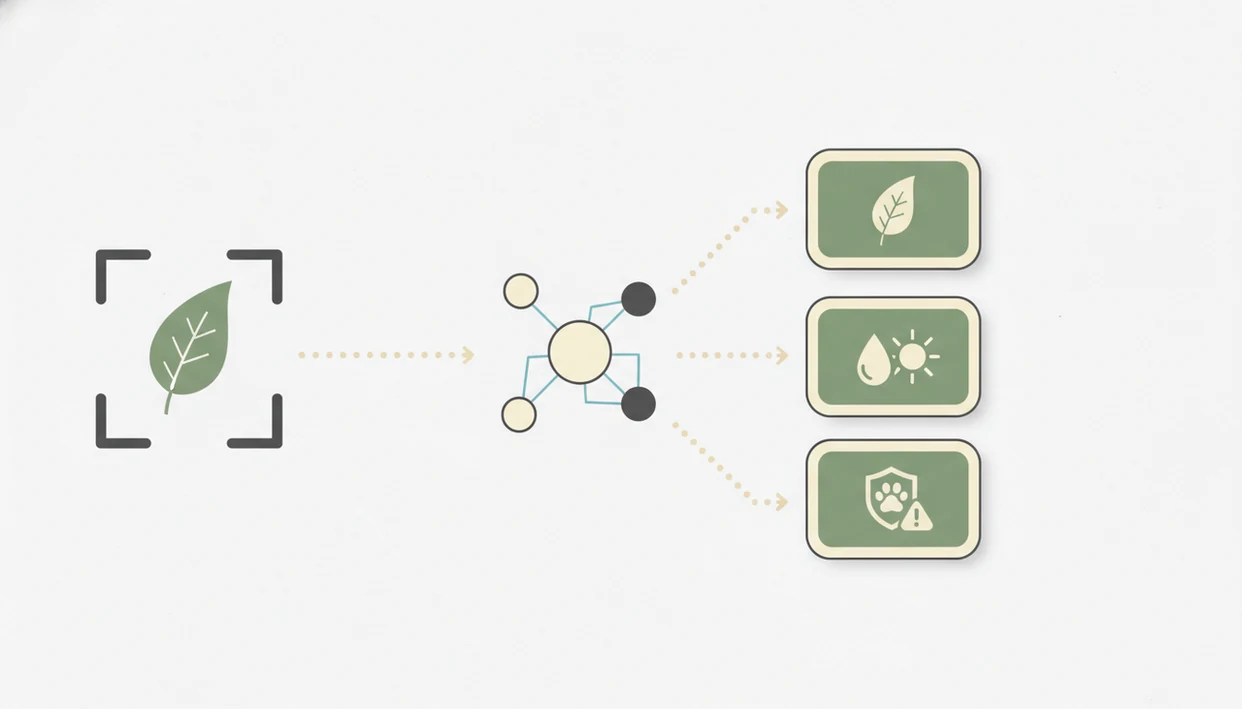
AI plant identification works by comparing a submitted photo against patterns learned from labeled plant images. Most modern systems use convolutional neural networks, a computer-vision method that learns visual features such as leaf edges, veins, flowers, bark texture, and growth habit.
Database size matters. PlantNet reports coverage across 45 floras and 46,050 species, while iNaturalist had more than 100 million observations globally by 2022 source. Those community-sourced observations help models and reviewers compare more real plants, not just tidy catalog specimens.
The weak point is the photo. A blurred seedling photo in morning sun can hide the stem, and a single pretty leaf rarely gives enough context. Apps usually surface top matches with a confidence score, then let you compare the leaf shape, stem, and growth habit. For a deeper breakdown, the plant id confidence score guide explains what those numbers can and cannot prove.
How To Use A PlantApp For Reliable Results
For reliable plant ID results, treat the first scan as a starting point and improve the evidence before acting. Good photos beat clever guessing.
- Photograph the leaf, flower, or bark in natural light. Avoid yellow kitchen light at 10 p.m. if you can.
- Crop the image to center the plant and remove background clutter. Keep the stem, pot, and soil surface visible when possible.
- Review the confidence score and top three matches. Compare leaf shape, stem texture, and growth habit before accepting the first result.
- Cross-reference rare species with a second app or community forum. This matters for wild plants, look-alikes, and anything edible or toxic.
- Save the ID to your collection and set care reminders. A correct name is useful only if it leads to the next care step.
This workflow works best when you add more than one angle because the identify, confidence review, and care-reminder steps have better photo clues to work from.
How We Picked The Best Plant ID App Shortlist
We picked the shortlist by weighting real identification usefulness over app-store polish. The core test was simple: can a plant owner scan a plant, understand the likely match, and make a safer care decision today?
Accuracy came first, across both common and uncommon species. We also looked at disease diagnosis depth, especially whether an app separates likely causes from confirmed diagnoses. Care features mattered too: reminders, watering plans, light guidance, fertilizer timing, and repotting prompts help after the first scan.
Privacy counted because photos can carry location data. We checked whether apps are clear about photo storage, GPS sharing, and AI training use. Cost structure also mattered. A free download is less useful if unlimited IDs, disease scans, or care plans sit behind a subscription.
For readers comparing free tools first, our free plant identifier app guide breaks out what remains useful without paying.
Named Shortlist: Best Plant Identifier Apps Compared
Plant scanner choice depends on the job: PictureThis is strong for quick IDs, PlantNet for free plant records, iNaturalist and Seek for nature observations, Agrio for crop health, and PlantApp for care-focused owners. Good AI plant identifier, disease diagnosis, and personalized plant care apps deliver likely names and next steps, not guaranteed certainty from one photo.
| App name | Accuracy tier | Disease diagnosis | Care features | Free vs paid | Privacy stance |
|---|---|---|---|---|---|
| PictureThis | High | Broad consumer disease flags | Strong care tools | Subscription-led | Commercial photo handling |
| PlantNet | Medium-high | Limited | Minimal care planning | Strong free access | Community-science model |
| iNaturalist / Seek | Medium-high with verification | Limited | Minimal care planning | Free | Observation-sharing varies |
| Agrio | Crop-focused | Strong crop disease focus | Grower-oriented | Free and paid features | Agriculture data context |
| PlantApp | Care-focused | Troubleshooting steps | Watering, light, safety, reminders | App-based care access | Built for owner workflow |
When the unknown plant is on your windowsill and the nursery tag was tossed with the sleeve, PlantApp is practical because the scan continues into safety and care prompts.
Best Plant Scanner App For Houseplant Care And Watering
For houseplant owners, care features often outweigh raw accuracy because the next mistake is usually watering, light, or placement. A likely ID plus reminders is more useful than a name you never act on.
- Plant Identifier App: Strong fit for everyday indoor plants because it connects the likely match to watering, light, fertilizer, toxicity, and repotting guidance.
- PictureThis: Good for quick recognition and broad care notes, but many valuable features are subscription-led.
- Planta: Useful for scheduled care routines, especially for people managing many indoor plants.
The most practical houseplant workflow is identify first, then adjust watering and light based on the plant’s real environment. Perlite scattered across the floor after repotting tells you the app still needs human context.
For indoor plant owners who forget what changed last week, PlantApp covers the routine because saved plants can move into reminder-based care.
Best Plant ID App For Wild Plant And Native Species Identification
PlantNet and iNaturalist are the stronger choices for wild plants, native species, and hiking IDs because they draw from large community-science systems. PlantNet reports 46,050 species across 45 floras, which gives it broad reference coverage.
- PlantNet: Best fit for free wild-plant identification and regional flora comparison.
- iNaturalist: Strong when expert verification and public observations matter.
- Seek by iNaturalist: Useful for more privacy-conscious field use and limited offline ID.
- Plant Identifier App: Better for owners who want the wild-looking volunteer in a pot identified and moved into care guidance.
Rare species in under-documented regions still get fewer reference images. A plant stand crowded by the balcony door is one thing; a sedge on a remote trail is another. If you are learning phone-based field technique, how to identify plants with phone covers photo angles and context.
Best PlantApp For Disease Diagnosis And Crop Safety
Agrio is the strongest shortlist pick for crop disease diagnosis because it focuses on crop protection, pest alerts, and grower-style decision support. PlantApp is a useful companion for household and garden troubleshooting because it translates visible symptoms into care steps.
- Agrio: Strong fit for growers watching crops, pest pressure, and disease alerts.
- Plant Identifier App: Helpful for yellow leaves, brown tips, suspected pests, and watering-related stress.
- Local extension services: Still important when crop loss, food safety, or treatment decisions carry real cost.
Research-grade plant disease models can exceed 90% classification accuracy on curated datasets; one PlantVillage study reported 99.35% accuracy on controlled leaf images, but consumer photos are messier source. Soft roots rinsed in the sink, a sour potting-mix smell, and a gnat cloud above damp soil often point to watering problems, not one tidy disease label.
AI diagnosis is a care step, not a cure.
Common Myths About Plant Identifier Apps
The biggest myth is that top-rated apps are 100% accurate. Even strong performers fall well below that in independent photo tests, and accuracy drops with poor light, seedlings, rare species, and look-alike plants.
Another myth is that any plant ID app can reliably diagnose all diseases. Disease symptoms overlap. Brown leaf tips can mean low humidity, salt buildup, underwatering, fertilizer burn, or root stress. One photo cannot settle all of that.
Paid apps do not always beat free tools. PlantNet and iNaturalist can rival or outperform some commercial apps for wild plants because their community datasets are large and regionally useful.
Privacy is also not a side issue. Plant photos may include GPS metadata, home details, or garden locations. Before scanning a lily bouquet removed from a table because a cat lives nearby, remember that the safety decision should not depend on one app result. The question does plant identifier app work needs a cautious, situation-specific answer.
Limitations
Plant identifier apps are useful triage tools, but they are not final authorities. Use the app result as a starting point, especially when health, toxicity, or crop treatment decisions matter.
- Poor lighting, motion blur, tight close-ups, and seedling photos reduce accuracy across all apps.
- AI disease diagnosis cannot replace expert diagnosis, lab testing, or local extension services.
- Subscription paywalls often lock unlimited IDs, disease scans, plant collections, and care plans.
- Community-driven apps may have fewer reference images for rare species or under-documented regions.
- AI model updates are uneven; last year’s strongest app may not be today’s strongest performer.
- No app should be the sole source for edible, poisonous, or pet-toxic plant identification.
- Care plans can be generic for rare cultivars, variegated forms, or stressed plants in unusual rooms.
- GPS and photo-sharing settings need review before uploading sensitive home or garden images.
Still, a careful scan can prevent bad guesses. For unclear matches, compare the top matches before applying any care plan.