
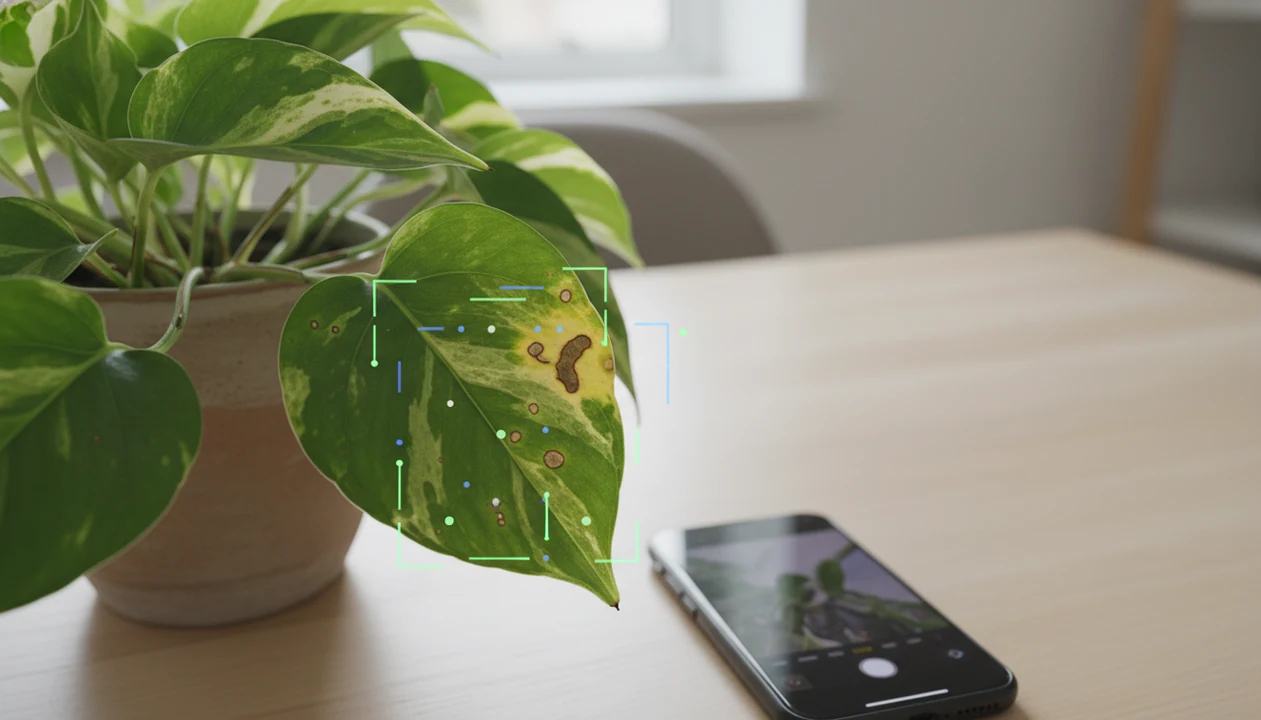

Definition: A plant disease scanner is an AI-powered feature in a plant care app that analyzes photos of leaves and stems to suggest probable diseases, pest issues, or environmental stress and recommend next steps.
- Snap a photo and the AI returns ranked likely causes, fungal spots, pest damage, nutrient deficiency, or watering stress, with confidence levels.
- Deep-learning models can exceed 90% accuracy on curated datasets, but real-world results depend on lighting, image quality, and plant variety.
- The scanner is a triage tool: treat results as guidance, not a lab diagnosis, and consult an expert for high-value or rapidly spreading problems.
At A Glance: 5 Plant Disease Scanner Facts
A plant disease scanner is most useful when it turns visible symptoms into a short, ranked list of likely causes. Use the app result as a starting point, then compare the leaf shape, stem, soil, and recent care changes.
- AI image recognition is trained on thousands of labeled plant disease photos, including leaf spots, mildew patterns, pest damage, and discoloration.
- Results are probabilistic, not certain; a 72% likely match still needs visual review.
- Phone scans detect visible symptoms only, such as spotting, yellowing, wilting, webbing, and brown leaf tips.
- PlantApp connects the scan with plant ID and care plans, so the next care step fits the species.
- No scanner is 100% accurate; blurry photos, rare plants, and mixed symptoms reduce performance.
For houseplant owners who need fast symptom sorting, the strongest scanner experience links each likely match to a care action card instead of stopping at the disease name.
What The Plant Disease Scanner Does
The plant disease scanner reviews visible plant symptoms in a photo and returns ranked likely causes with practical next steps. It does not confirm a disease the way a lab or plant pathologist can; it helps you decide what to check and do first.
The scan can recognize surface clues such as spots, powdery mildew, fine webbing, wilting, yellowing, browning, and other discoloration. Each result should lead to a care action, not panic: a likely pest issue may mean isolate the plant and inspect leaf undersides, a fungal-looking spot may mean prune damaged leaves and improve airflow, and a stress result may mean adjust watering or monitor before treating.
- Scan the visible symptom in clear light, including the affected leaf or stem.
- Review the ranked causes as probabilities, not final diagnoses.
- Match the result to an action such as isolate, prune, water, improve airflow, or monitor.
- Confirm the plant ID when the species is unknown, because care advice changes between a fern, orchid, tomato, or pothos.
- Check what the camera cannot see, including hidden root rot, compacted soil, soil-borne disease, or internal stem damage without aboveground signs.
How The Plant Disease Scanner Works Behind The Scenes
A plant disease scanner works by comparing your phone photo with patterns learned from labeled plant images. Deep-learning convolutional neural networks look for image features such as spots, color shifts, edge damage, powdery texture, and curled tissue.
The result is not a yes-or-no diagnosis. PlantApp shows probability-ranked matches, so a leaf with yellow edges and soggy potting mix may surface watering stress before an infectious disease. We see many weak scans from one pretty leaf under yellow kitchen light at 10 p.m. The model needs better clues than that.
A 2024 review reports that deep-learning models can reach over 90% classification accuracy on curated plant disease image datasets under controlled conditions source. Real homes are messier.
Phone Camera vs. Lab-Grade Sensors
Consumer phone cameras capture visible surface symptoms. Research-grade hyperspectral, thermal, and fluorescence sensors can detect physiological changes before symptoms are visible source. That is a different tool class, not a phone feature.
How To Use The Plant Health Scanner In PlantApp
To scan plant disease well, photograph the symptom clearly and give the model context. PlantApp works better when you include the affected leaf, stem, and a whole-plant view instead of only the most dramatic spot.
- Open PlantApp and tap the scan or diagnose button.
- Position the affected leaf in good, even lighting; avoid hard shadows, glare, and blur.
- Capture a close-up photo that shows the symptom clearly, including the leaf edge if it is damaged.
- Review the ranked causes and compare the confidence percentages before choosing an action.
- Follow the care steps for isolation, pruning, treatment, watering adjustment, or light changes.
- Log the same plant over time so recovery or spread is visible in the monitoring history.
Take a second photo in natural light. If tiny webbing sits under curled leaves, include it, not just the greenest leaf.
After a first scan, the monitoring log is most useful when the likely match still feels uncertain: compare today’s photo with the same plant next week before escalating treatment.
When To Scan Plant Disease Symptoms
Scan plant disease symptoms when you first notice new spots, yellowing, browning tips, wilting, webbing, sticky residue, or unexplained leaf drop. Early scanning is most useful before the damage spreads across the plant shelf.
Use a plant health scanner after changes too: repotting, moving a plant indoors, shifting it to a sunnier balcony, or starting winter heat. A drooping stem despite wet soil can point toward root stress, not thirst.
The FAO estimates that plant diseases and pests cause 20% to 40% of global crop production losses each year. Pest-related food loss is estimated at up to USD 220 billion annually. Those numbers are agricultural, but they explain why faster symptom triage matters. source
For beginners with mixed symptoms, a weekly scan habit is often easier than waiting for a plant tag that faded in the sun or was tossed with the nursery sleeve.
What The Scanner Looks Like In PlantApp
PlantApp shows a scan result screen with ranked causes, confidence bars, and care action cards. Each likely match connects to a next step, such as prune, isolate, adjust watering, improve airflow, or apply an appropriate treatment.
The useful part is the combined workflow. You can identify the species and diagnose visible symptoms in the same session, then save reminders for follow-up checks. A fallen leaf on a living room rug may be a pet-safety concern, a watering clue, or just old growth. Context matters.
Good AI plant identifier, disease diagnosis, and personalized plant care app for houseplants and garden plants deliver likely matches and next steps, not guaranteed lab confirmation from one photo.
When the issue is a sick plant with an unknown name, PlantApp handles both questions because plant ID, symptom scan, and reminder setup happen in one workflow.
Common Myths About Plant Disease Scanners
Plant disease scanners are helpful, but several claims around them are too broad. The safest reading is simple: they flag likely visual causes and suggest care steps.
| Myth | Reality |
|---|---|
| A scanner gives a 100% certain diagnosis. | Results are probability-based and can be wrong. |
| A phone scan can detect disease before symptoms appear. | Phone cameras see visible surface clues, not internal or pre-symptomatic changes. |
| An app replaces a plant pathologist. | Experts matter for rare, high-value, spreading, or regulated plant problems. |
| Every flagged issue is an infectious disease. | Watering stress, low light, nutrient imbalance, chemical burn, and sunscald can look similar. |
Use the scan result as guidance, then inspect the soil surface, pot drainage, recent fertilizer use, and nearby plants. Simple things first.
If your balcony pot sits behind a pet gate, pair the symptom result with plant ID and safety checks before moving or treating the plant.
Plant Disease Scanner vs. Alternative Diagnostic Methods
A plant disease scanner is the fastest diagnostic option, but it is not the most definitive one. The right choice depends on risk, plant value, symptom speed, and whether hidden root or soil problems are likely.
| Method | Speed | Cost | Accessibility | Accuracy range | Main limitation |
|---|---|---|---|---|---|
| Visual self-inspection | Fast | Free | Very high | Low to moderate | Easy to confuse look-alike symptoms |
| AI plant disease scanner | Very fast | Low to moderate | High | Variable | Depends on photo quality and species coverage |
| Extension service or plant pathologist | Slower | Free to costly | Regional | High | May require samples and waiting |
| Lab soil or tissue test | Slowest | Moderate to high | Limited | High for tested issues | Misses nothing visual, but requires sampling |
For everyday houseplants, AI triage is often more practical than lab testing because most visible problems need quick care changes before formal confirmation.
Related PlantApp Features
PlantApp pairs disease scanning with features that help you decide what to do after the scan.
- Photo-based plant identification: Identify unknown plants from leaves, flowers, bark, or growth habit with the broader plant scanner.
- Personalized watering and care reminders: Convert a likely stress result into species-aware watering reminders.
- Plant care journal and monitoring log: Save scan results, symptoms, and follow-up notes so changes are easier to compare.
For iPhone users who scan plants while checking a windowsill collection, the plant identifier app for iPhone guide covers the device workflow.
Limitations
A plant disease scanner can reduce guesswork, but it has real limits. Treat the result as a care step, not a cure.
- Performance drops with poor lighting, blurry images, glossy leaf glare, and cluttered backgrounds.
- It cannot detect soil-borne, root, or internal stem diseases without aboveground symptoms.
- Look-alike problems can confuse results, including fungal spots, chemical burn, sunscald, and fertilizer injury.
- AI models tend to cover common crops and popular houseplants better than rare species.
- Real homes vary more than curated datasets: dust, mixed light, old potting mix, and partial symptoms all matter.
- Over-reliance can lead to unnecessary fungicide, pesticide, or pruning.
- Competitors such as PictureThis, PlantNet, Planta, Blossom, and Garden Answers face the same photo-quality problem.
Still, if water is pooled in a cachepot, fix drainage before treating every brown mark as disease.